Telegram AI assistant: draft, rewrite, and auto-post with AI
Running an active Telegram channel means writing — constantly. Posts, rewrites, translations, summaries. An AI assistant takes that load off your hands two ways: on demand, it drafts and rewrites in your voice; and on its own, autonomous agents generate and publish posts on a schedule. You go from writing every message to steering a system that writes for you. Here's how it works, with real screenshots.
Two kinds of AI: on-demand and autonomous
It helps to split "AI for Telegram" into two jobs. The first is on-demand: you ask, it produces — draft this post, rewrite it shorter, translate it to English, summarize this thread. The second is autonomous: an agent you configure once and it keeps posting on its own. Most operators want both, and they share the same pool of AI credits.
Step 1 — Connect your channel
Link the channel or bot the AI should work with. From there the assistant has context — what the channel is about, what you've posted before — so drafts land closer to your voice instead of generic filler.
Step 2 — Draft, rewrite, translate, summarize
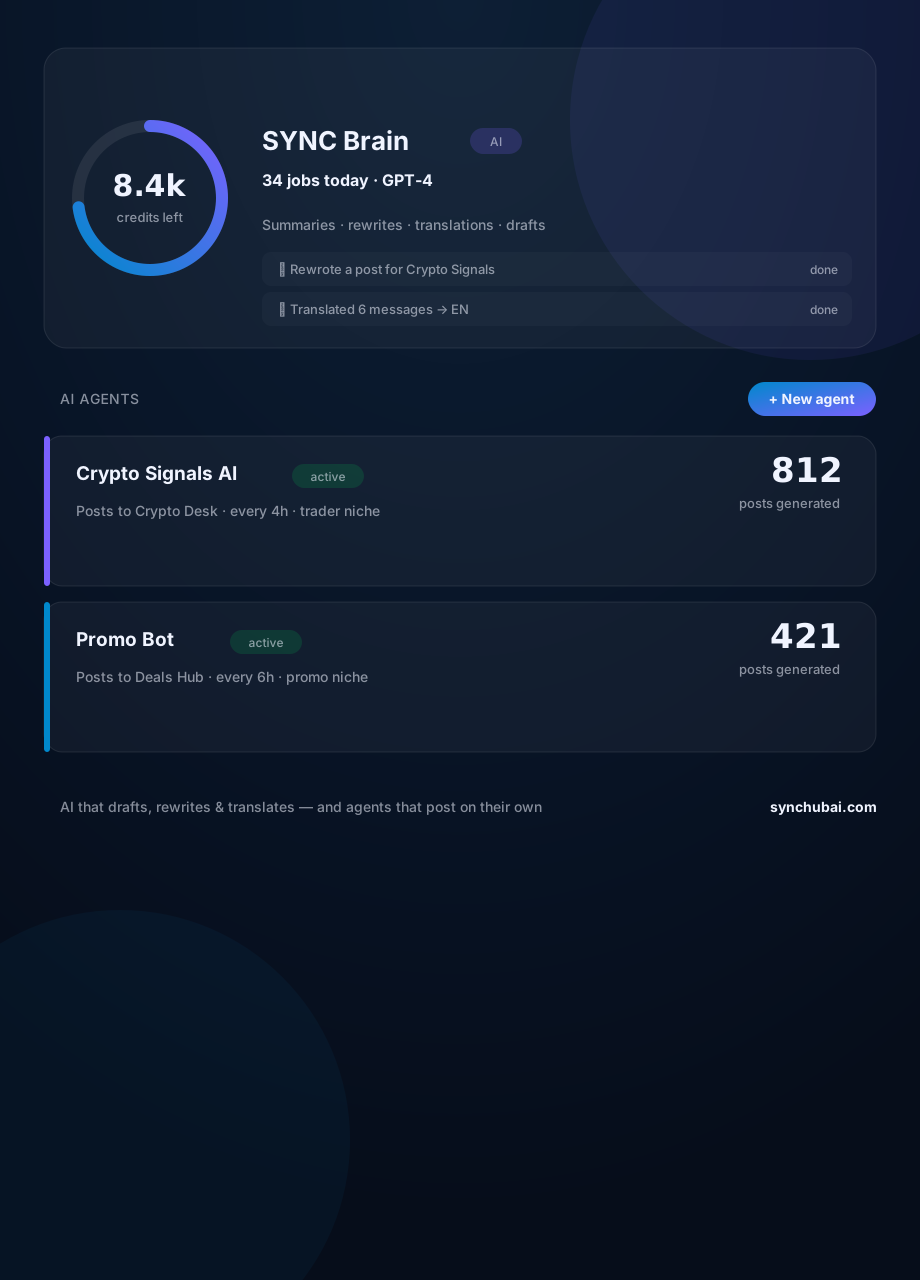
This is the everyday workhorse. Ask for a post and get a draft. Paste a clunky message and get a cleaner rewrite. Drop a long thread and get a summary. Give it a Portuguese post and get an English version. Each request is one AI job — you can see recent jobs and how many credits you have left at a glance (top of the screenshot).
Step 3 — Create an AI agent
An agent is where AI stops being a tool you poke and becomes something that works while you're away. You give it a niche (say, crypto signals), a target channel, and a cadence (every four hours). From then on it generates and publishes on its own. In the screenshot, "Crypto Signals AI" has produced 812 posts and "Promo Bot" 421 — none of which anyone typed by hand.
Step 4 — Auto-post or approve first
You stay in control of the risk. Low-stakes niches can auto-post on their cadence. For anything sensitive, keep the agent on approve-first so each draft waits for your yes. The point isn't to remove the human — it's to remove the typing.
Step 5 — Keep an eye on credits
Every AI job — a rewrite, a translation, an agent post — spends credits. That's what keeps cost honest and predictable: you can see exactly how much AI you're using and top up when you need more, rather than paying a flat fee for capacity you don't touch.
Where the AI fits
AI is the layer that fills your channels; the plumbing that moves the content is separate. Pair the assistant with message forwarding (mirror and rewrite between channels), channel automation (scheduling and routing), and a Telegram CRM to turn the audience it attracts into tracked contacts.
Frequently asked questions
What can an AI assistant do for a Telegram channel?
It drafts posts, rewrites messages in your voice, summarizes threads, and translates content — and with autonomous agents it can generate and publish posts on a schedule, so the channel stays active without you writing every message.
What is a Telegram AI agent?
A saved configuration — a niche, a target channel, and a cadence — that generates and posts content on its own, like a "Crypto Signals" agent that publishes every four hours.
Does AI content need to be reviewed before posting?
You choose. Agents can auto-post, or hold each draft for approval. Most operators auto-post low-risk niches and review anything sensitive.
Let AI write and post for you.
Draft, rewrite, and translate on demand — or set an agent loose to post on its own. Free to start.
Start free in SYNC Hub