Telegram broadcast: send segmented bulk messages to your users
A broadcast is how you reach everyone who started your bot at once — a launch, an offer, an update. But blasting the same message to your entire list is how you get muted and blocked. The better move is segmented: message the right slice of your audience, preview exactly how many people match, and track what happened. Here's how it works, with real screenshots.
What a Telegram broadcast is (and isn't)
A broadcast sends one message, through your bot, to the users who have already started it. That last part matters: a bot can only message people who opted in by tapping Start. So a broadcast isn't cold outreach to strangers — it's a direct line to an audience that already raised their hand. That's exactly why it works, and why it stays compliant.
Step 1 — Write the message
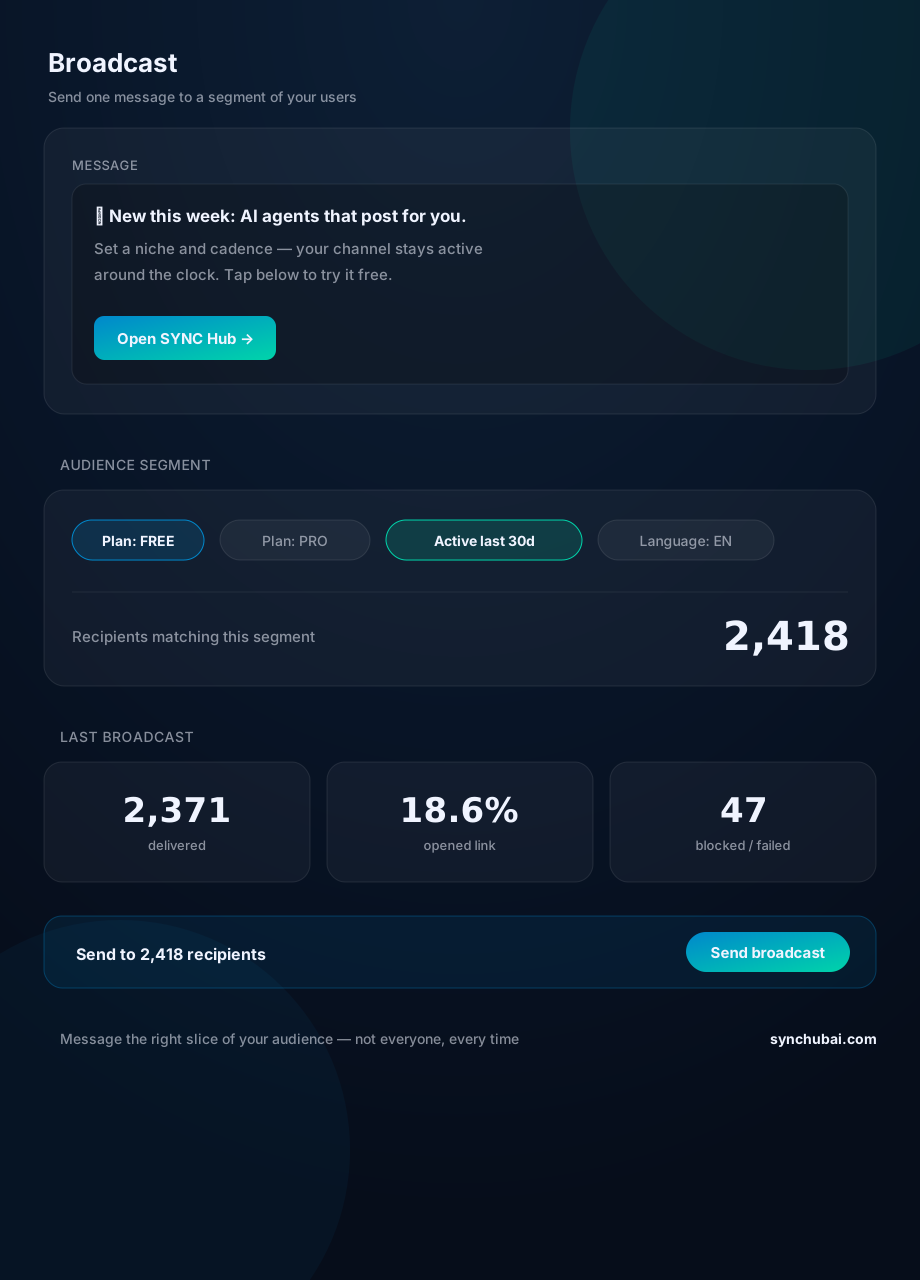
Compose it like a post: a clear line, and a button with a link if you want to measure clicks. Keep it to one idea. A broadcast that asks for a single action outperforms a wall of text every time (see the composer at the top of the screenshot).
Step 2 — Pick a segment, not "everyone"
This is the whole game. Instead of blasting your full list, filter it: only free-tier users for an upgrade nudge, only active users for a launch, only English speakers for an English offer. Every filter you add makes the message more relevant — and relevance is what keeps people from muting you.
Step 3 — Check the recipient count before you send
Segmenting is only useful if you can see what it selects. The count updates as you add filters — in the screenshot, the current segment resolves to 2,418 recipients. You know precisely who this goes to before a single message leaves, so there are no surprises.
Step 4 — Send
One tap delivers the message to everyone in the segment, paced so it doesn't trip Telegram's rate limits. You compose once; the system handles the fan-out.
Step 5 — Track delivery (and clean your list)
After sending you get the numbers that matter: delivered, link opens, and blocked/failed. The blocked count is a gift, not a failure — it tells you who left, so you can keep your list healthy. Consistently high opens on a tight segment beat a huge list nobody reads.
Where broadcasting fits
Broadcasting is the outbound half of audience operations; the inbound half is knowing who your users are. Pair it with a Telegram CRM so segments are built from real contact data, use lead management to keep those contacts organized, and let the AI assistant draft the message itself.
Frequently asked questions
How do I send a broadcast to all my Telegram bot users?
Compose a message and send it through your bot to everyone who started it. You can broadcast to your whole list or to a filtered segment, and preview the exact recipient count first.
Can I message only part of my audience?
Yes — segment by plan, activity, or language so each message goes only to the users it's relevant to, instead of the whole list.
Can a bot message users who never contacted it?
No. Bots can only message users who have started them. A broadcast reaches your opted-in subscribers, which keeps it compliant and spam-free.
Reach the right users, not all of them.
Write once, filter your audience, preview the count, and track every delivery. Free to start.
Start free in SYNC Hub