White-label Telegram bot: run the platform under your own brand
Most Telegram tools force your customers to talk to their bot. A white-label setup flips that: your users see your name, your @handle, your Mini App — while automation, CRM, and AI run underneath, invisible. It's the difference between reselling someone else's product and owning yours. Here's how it works, with real screenshots.
What "white-label" actually means here
A white-label Telegram bot runs on a shared engine but wears entirely your identity: your bot name, your @handle, your accent color, and — critically — no "powered by" watermark your customers can see. To them it's your product. To you it's the whole automation, CRM, and AI stack without building any of it. You keep the brand equity; the platform stays behind the curtain.
Step 1 — Create a bot with BotFather
Everything starts with a token. In Telegram, open @BotFather, create a new bot (or reuse one), and copy the token it gives you. This is the bot your customers will actually message — so name it for your brand, not ours.
Step 2 — Connect the token
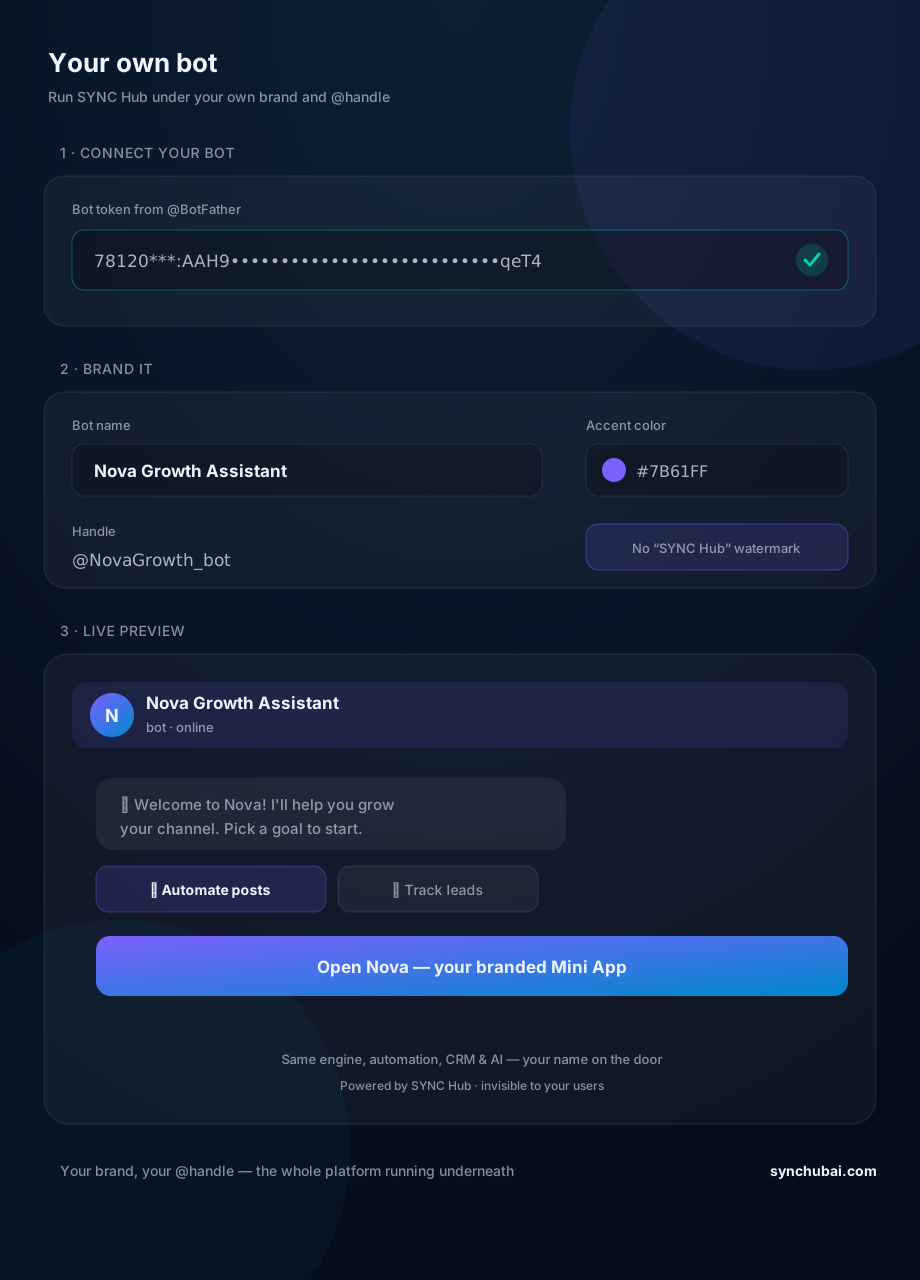
Paste the token to link your bot to the engine (top of the screenshot — the green check confirms it connected). That single step is what puts the full platform behind your bot instead of the default one. No servers to run, no code to deploy.
Step 3 — Brand it
Set the name your users see, an accent color, and confirm the handle. In the screenshot the bot becomes "Nova Growth Assistant" at @NovaGrowth_bot in purple — with the platform watermark switched off. This is the layer that makes it feel native to your business, not a rebranded template.
Step 4 — Go live
Now your customers open your bot and land in your branded Mini App — same onboarding, same buttons, your name on the door (see the live preview). The engine underneath is identical to what everyone else runs; the experience on top is unmistakably yours.
Step 5 — Operate as usual
Behind your brand, nothing is missing. Scheduling, forwarding, the CRM, AI drafting and agents — all of it works exactly as documented, just under your handle. You run a full Telegram growth platform without maintaining one.
Where a branded bot fits
White-label is the wrapper; the value is what runs inside it. Give your users automation and message forwarding, a real Telegram CRM, and an AI assistant — all under your own name.
Frequently asked questions
What is a white-label Telegram bot?
A bot that runs on a platform's engine but appears entirely under your brand — your name, handle, and colors, with no visible mention of the underlying platform.
How do I run my own branded Telegram bot?
Create a bot with @BotFather, connect the token to SYNC Hub, and set your name, handle, and color. Automation, CRM, and AI then run under your brand.
Do my users see that it's powered by another platform?
No. On a white-label plan the watermark is removed — your users see only your bot and branded Mini App, with the engine invisible underneath.
Put your name on the whole platform.
Connect a BotFather token, brand it, and run automation, CRM, and AI under your own bot. Free to start.
Start free in SYNC Hub